Amazon Bedrock AgentCore · PingOne Authorize · CIBA
An AI agent that asks before it deletes
How we put PingOne Authorize on every tool call through AgentCore Gateway, and made the sensitive ones wait for the user's approval on another device.
Give an AI agent a few tools and it will use them. That's the point, and it's also the problem. An agent that can look up an account can usually change it, and an agent that can change an account can often delete it. The model decides which tool to call. Somebody else has to decide whether it should.
We built a demo where that somebody is PingOne. A user-admin agent runs on Amazon Bedrock AgentCore Runtime and manages people's accounts in Snowflake and Slack through AgentCore Gateway. Every tool call it makes goes past PingOne Authorize, and a delete waits until the user approves it on another device. This post walks through how it works and what we learned building it.
The demo in three acts
Alice works on the help desk. Bob is an IAM admin. Both ask the same agent to manage Carol Martinez, a member of the demo team.
- Act 1
Alice changes Carol's title in Slack. Her role allows changes, the policy permits the call, and Slack updates the title.
- Act 2
Alice tries to delete Carol from Snowflake. The policy refuses before Snowflake is reached, and the agent passes on the policy's reason.
- Act 3
Bob asks for the same delete. His role allows deletes, but only with his approval. The chat shows a code such as
APR-4821, Bob gets an email showing the same code, and the delete runs once he approves.
Next to the chat, the app shows an identity trail: every token in the chain, who it's for, who is acting, and where it's valid. Most of the interesting work happens where an audience can't see it, so the trail puts it on screen.
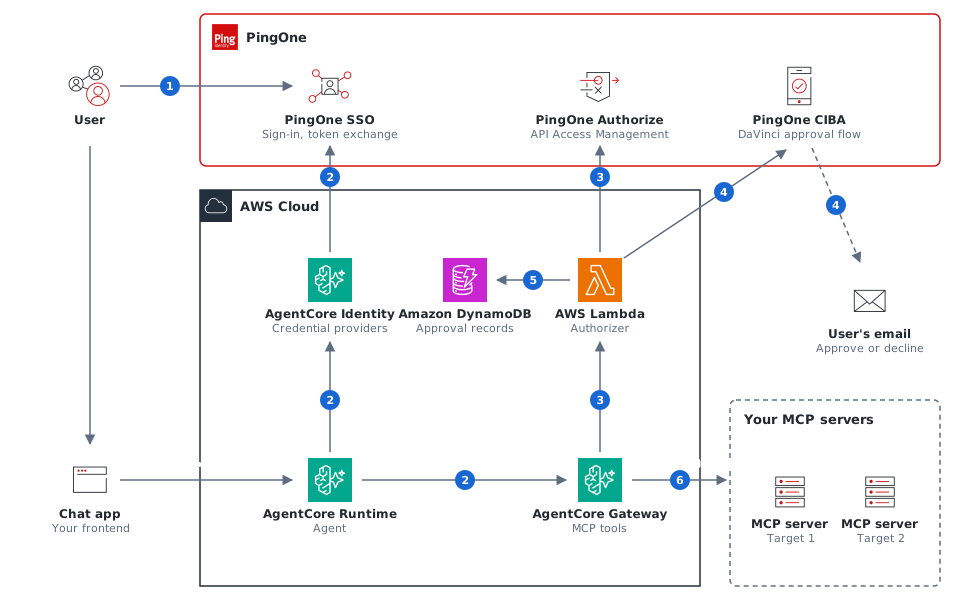
One policy for every tool call
AgentCore Gateway lets you attach a Lambda interceptor that sees every MCP request before it reaches a target, and every response before it reaches the client. The PingOne Authorize sideband authorizer for AgentCore Gateway uses that hook to send each request to PingOne Authorize API Access Management, which then protects the Gateway the way it protects any other API.
The policy reads the user's permissions from the Gateway token, plus the JSON-RPC method, the tool name and the tool's arguments from the request body. Ten rules, checked in order, cover the demo:
- Requests that aren't tool calls, such as connecting and listing tools, go through.
- Look-ups need
users:read, changes needusers:write, and deletes needusers:delete. - Changes and deletes may only touch the demo team's accounts.
- A delete without an approval asks for one.
- Any tool the policy doesn't know is refused.
Because the rules live in PingOne, the security team can change them without touching the agent or the MCP servers. A new tool on a target is refused until someone writes a rule for it.
Each denial carries its reason in plain words, and the agent shows it to the user. In act 2, Alice reads:
Your PingOne role does not allow you to delete or deactivate users (it lacks users:delete)
A bare "Request denied" leaves people guessing. This tells Alice what she's missing, and who to ask.
Approvals the agent can't fake
Some actions need more than permission. Bob may delete accounts, and we still want him to confirm each one. That's what CIBA (Client-Initiated Backchannel Authentication) is for: an application asks the identity provider to get the user's consent on another device, then polls until the user answers.
The question is who starts it. If the agent starts the approval, the model is in the loop, and a prompt injection could skip the step or get something else approved. So in the demo the policy asks for the approval, and the interceptor runs CIBA itself:
- The policy denies the delete with a challenge that asks for the
ciba-approvalACR. - The interceptor sends PingOne a CIBA request naming Bob, with a short binding code, and answers the agent with JSON-RPC
-32004and a reference. - The agent shows the code and replays the same call every few seconds, with the reference in
params._meta. - Once Bob approves, the interceptor checks the approval and asks PingOne Authorize again with a trusted header that marks the call as approved.
{
  "jsonrpc": "2.0",
  "id": 7,
  "error": {
    "code": -32004,
    "message": "Approval required",
    "data": {
      "reason": "approval_required",
      "reference": "<auth_req_id>",
      "referenceMetaKey": "pingidentity.com/ciba-reference",
      "interval": 5,
      "bindingMessage": "APR-4821",
      "expiresIn": 300
    }
  }
}
A few properties make the approval hold up:
- It covers one request. The interceptor records which call the CIBA request was for: the method, a hash of the arguments, and the user. A replay with other arguments or by another user is refused.
- It works once. The first use writes a record to DynamoDB that can only be written once.
- Only the interceptor can mark a call approved. The approval header is stripped from everything the agent sends.
- Nothing secret is stored. DynamoDB keeps hashes and approval markers, and they expire on their own.
Why not MCP elicitation?
MCP lets a server ask the user a question in the middle of a call. We chose to replay a reference instead. Elicitation needs a client that supports it and a channel back to that client while the call is open, and in this design the party asking is the Gateway's interceptor, which isn't an MCP server. A reference works with an ordinary request and response. The MCP servers don't change at all, and the agent needs only a few lines of code to show a code and retry.
Who is acting? Follow the tokens
An agent acting for a user shouldn't just borrow the user's token. In the demo, each hop gets a new token from PingOne through OAuth token exchange (RFC 8693), and each one is valid in exactly one place.
| Token | Valid at | Says |
|---|---|---|
| Sign-in token | The agent runtime | sub Bob, may_act the agent |
| Gateway token | AgentCore Gateway | sub Bob, act the agent |
| Server token | Snowflake's MCP server | sub Bob, act the Gateway acting for the agent |
PingOne adds the act claim only when the party making the exchange is the one the previous token named in may_act. The claim is required, so an exchange by anyone else fails. Snowflake trusts PingOne directly and maps sub to the Snowflake user, so Snowflake's own roles still apply: Alice's Snowflake role can't delete either.
What we learned
Most of the work went into making AgentCore Gateway, PingOne and the authorizer agree on the details. Six lessons, in case you build something similar:
- Don't echo the Authorization header. When an interceptor returns an
Authorizationheader, AgentCore sends it to the target in place of the token the target's credential provider would mint. Our first build echoed the caller's Gateway token on every permit, and every user saw an empty tool list. The authorizer now drops the header unless the policy changed it. - Forwarded headers stop at 4 KB. Response authorization carries state from the request phase to the response phase in a header, and ours came to about 6 KB. The demo's outbound rules were all permit-by-default, so we turned response authorization off.
- Pass unchanged responses through explicitly. If the response phase returns nothing for a response it doesn't change, AgentCore sends the client an empty
{}. The interceptor has to echo the response back. - Set the subject token type. AgentCore's token exchange sends the generic JWT token type by default, and PingOne rejects it. Both exchanges override it to
urn:ietf:params:oauth:token-type:access_token. - Give people time to find the email. PingOne's CIBA requests expire after 120 seconds by default, which is short when the approval arrives by email, so we ask for 300, the maximum. Binding messages are limited to 8 characters, which is why the code looks like
APR-4821. - Test with real users. The targets list their tools by exchanging the user's token, so a machine token sees no tools at all. A smoke test that calls the Gateway with client credentials proves less than it seems to.
Set it up in your own environment
The setup guide covers the whole build in your own PingOne environment and AWS account, in front of your own MCP servers: the resources and claim mappings, applications, policy, credential providers, Gateway, authorizer Lambda and agent changes.
Read the setup guide